Cloud Backends: rent GPUs from inside SwarmUI
Tool

Cloud Backends: rent GPUs from inside SwarmUI

Hartsy
comments, jump to the thread 55 views

Features

  • One addable backend, four provider sections
  • Per-user backends on each user's own API key
  • Workers wake on demand and scale to zero
  • Live dropdowns populated from your account
  • Auto-stop on runtime or estimated spend
  • Every action reachable over the plain API

System requirements

API key
runpod_api or vastai_api under User Settings > API Keys
SwarmUI
Installed, with Show Advanced enabled under Server > Backends
RunPod worker
A network volume at /runpod-volume, 16GB VRAM or more, ~15GB container disk

Links

License

License
MIT

Run your SwarmUI generations on cloud GPUs. Workers wake on demand when you generate and scale back to zero when idle, so you only pay while you are actually using a GPU.

The extension is modular by design: one shared core handles the SwarmUI side, and each cloud provider is a thin adapter. Adding a provider means implementing a small interface, not writing another backend.

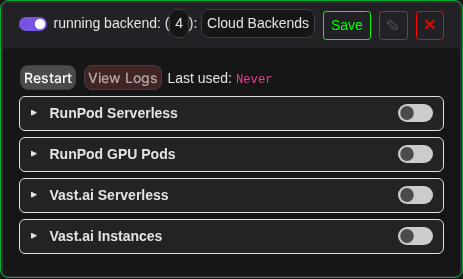
Server > Backends. One Cloud Backends entry among the advanced types, not four.

One backend, one entry point

Server > Backends has a single addable Cloud Backends type behind Show Advanced. Adding it gives you one settings card with a collapsible section per provider, RunPod Serverless, RunPod GPU Pods, Vast.ai Serverless and Vast.ai Instances, each with its own enable toggle and fields. No API key fields live in this card; those stay in User Settings > API Keys as always.

The card is a pool manager. Enabling a section makes that provider available, and an actual hidden backend is created per user, on that user's own API key, the first time the user generates or presses Start. The internal hidden backend types still exist, they just are not independently addable.

Cloud Backends card with all four provider sections collapsed

Per-user backends

Every cloud backend belongs to exactly one user and runs on that user's own key.

  • A user with no key on file gets a clean refusal, never another user's worker or bill.
  • A user's generations only route to, and are only accepted by, their own cloud backends.
  • Changing your API key takes effect on the next use automatically, with no disable and re-enable cycle.
  • A created pod or instance is remembered per user and reattached after a SwarmUI restart instead of creating a second billed one.
  • An implicitly created backend never spends money by itself. Serverless children never auto refresh models, because that wakes a billed worker, and instance children never auto start their instance.

Start, stop and failsafes

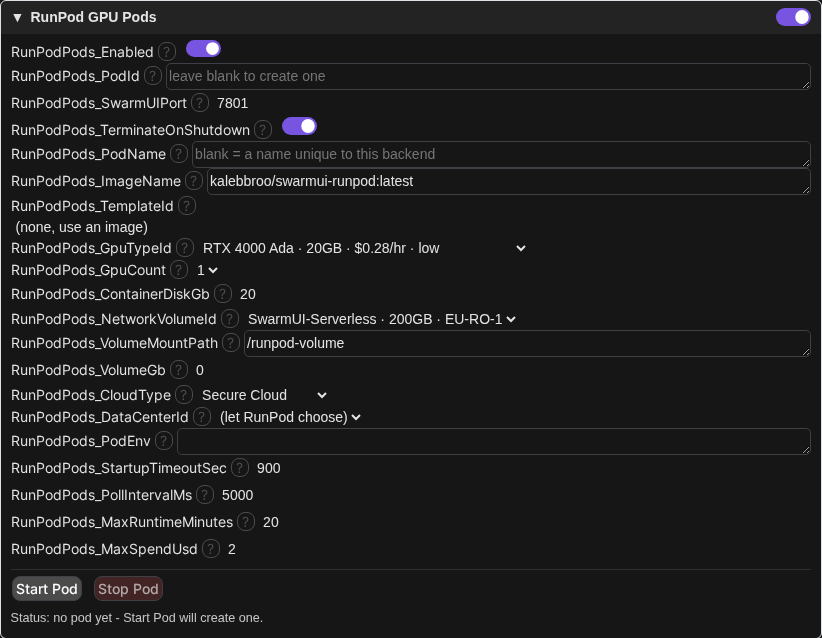
The two rent a whole instance sections get Start and Stop buttons with a live status line: state, GPU, cost per hour and uptime. Starting always confirms first, with a live price estimate when available, since either kind of instance bills continuously until stopped.

Two optional failsafes are available on each: auto-stop after N minutes of runtime, and auto-stop once estimated spend crosses a cap you set. Neither provider exposes a real time spend API, so the estimate is the provider's own reported hourly rate multiplied by uptime, computed locally rather than polled.

RunPod GPU Pods section expanded, with Start and Stop and the live status line

Provider status

Provider Status
RunPod Serverless Supported. Verified end to end against real hardware, including generation.
RunPod Pods Supported. Verified end to end live: create a pod, attach it as a real Swarm backend, generate, Start and Stop, terminate.
Vast.ai Serverless Built to the documented serverless contract. Config and credential handling verified against the live API; routing and generation are untested, since that needs a Vast account and a deployed worker.
Vast.ai Instances Built and verified against the official vastai Python SDK source. Config and credential plumbing, the live offer search and the Start/Stop UI flow are live-verified against a real account; actual instance creation and networking are still untested, since renting needs a funded account.

How it works

There are two shapes of provider here, because waking a serverless worker per request and renting a whole instance that stays up need different lifecycles.

Serverless wakes a worker on the first generate and talks directly to its SwarmUI over HTTP: GetNewSession, ListModels, SelectModel, GenerateText2Image, GenerateText2ImageWS. This deliberately does not reuse SwarmUI's built in SwarmSwarmBackend, which assumes the remote is reachable at startup and whose idle pings would keep a pay per second worker billing the whole time it is attached.

Instance rental is the opposite shape. Once a pod is running it stays up until you stop it, so there is no reason to reimplement the remote protocol. The backend drives the provider API to get a pod running with SwarmUI on it, then attaches an OwnerBoundSwarmBackend to its URL as a child and steps out of the way. That child does everything from there: sessions, model listing, generation, websockets, previews.

Permissions are use_runpod_serverless, use_runpod_pods, use_vastai, use_vastai_instances and cloudbackends_status. Every action is reachable over the plain API, and the start and stop calls have websocket variants that stream progress lines while a cold instance boots.

Setup for RunPod Serverless

  1. Deploy the worker, RunPod-Worker-SwarmUI, published as kalebbroo/swarmui-runpod:latest. The endpoint needs a network volume mounted at /runpod-volume, a GPU with at least 16 GB VRAM, roughly 15 GB of container disk, an execution timeout comfortably above your keepalive duration, and FlashBoot enabled.
  2. In SwarmUI, open User Settings > API Keys and set your RunPod key.
  3. Open Server > Backends, enable Show Advanced, and add Cloud Backends once. Expand the RunPod Serverless section, toggle it on, set EndpointId, and save.
  4. Initialization validates your key and endpoint against RunPod's health API before reporting as running, so a bad key or endpoint ID fails immediately with a clear message instead of at your first generation.

Setup for RunPod Pods

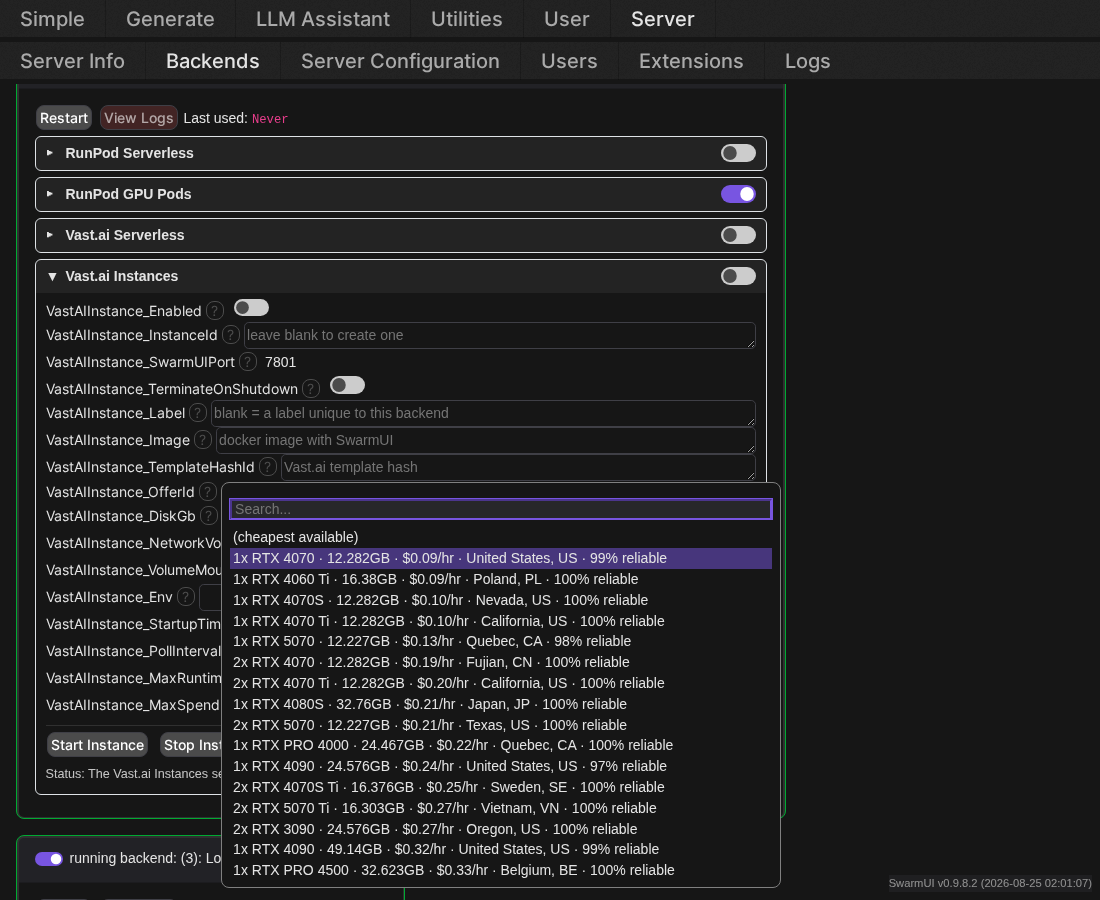
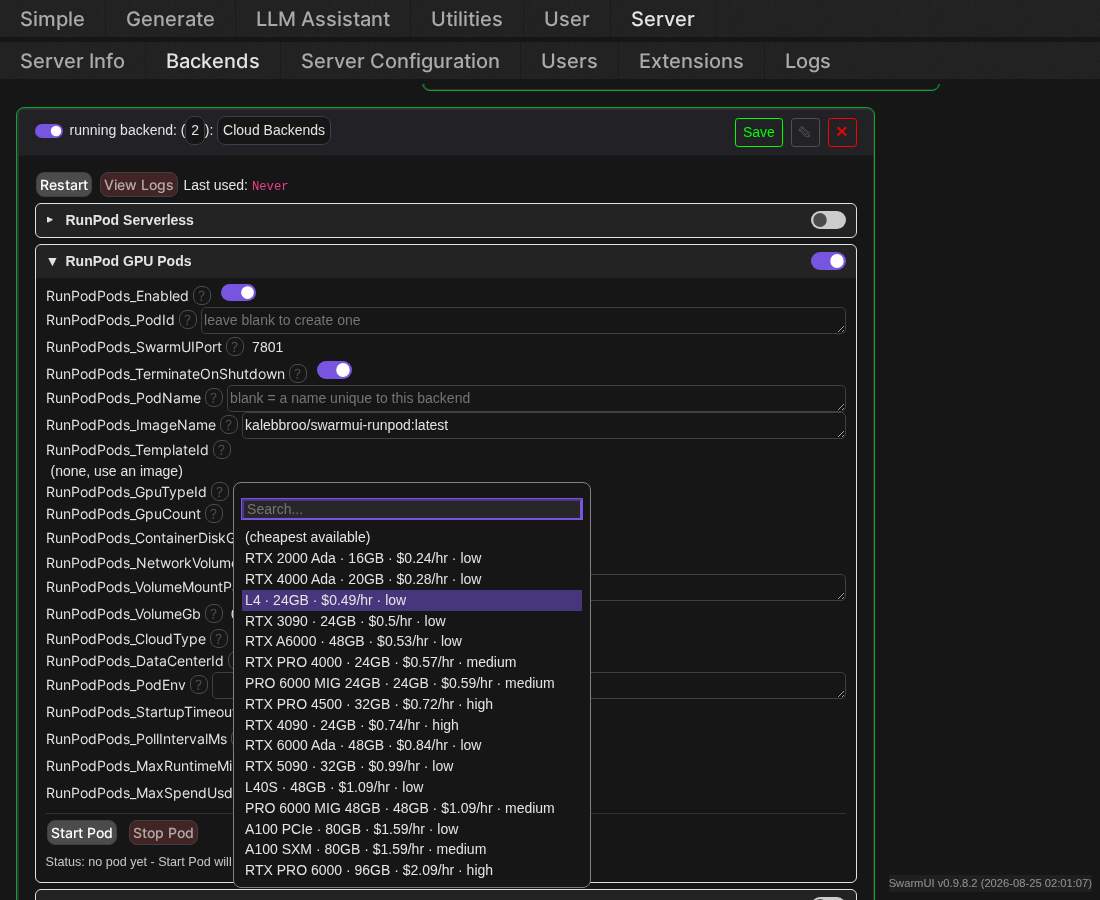
GPU Type dropdown open, listing real GPUs with live price and availability

A pod is a GPU you rent by the hour, so unlike serverless it bills continuously from the moment it starts until you stop it. Enabling the section and saving never starts or bills a pod by itself; it makes the Start Pod button usable.

Once you have a RunPod API key set, opening Server > Backends with Show Advanced on turns the GPU type, network volume, data center, template and pod ID fields into dropdowns populated live from your account, showing real availability and hourly price instead of asking you to type an exact GPU name from memory.

Leaving GPU type on its blank "(cheapest available)" entry asks RunPod's catalog which GPUs are actually available and tries them cheapest first. This matters because the API places exactly one GPU type per creation request and does not fall back on its own, so naming a single busy GPU type simply fails.

The pod's image must serve SwarmUI on SwarmUIPort, exposed as an http port so RunPod's proxy can reach it. RunPod's proxy applies no authentication of its own: anyone who knows the pod ID and port can reach that SwarmUI, so do not put anything sensitive on a pod you would not expose publicly.

The pod's own SwarmUI needs at least one backend of its own, ComfyUI typically, before anything can generate through it. A pod with an empty backend list attaches successfully but has nothing to route to. Add or change one after attaching and it is picked up automatically within a few seconds rather than needing a restart.

A worker image built for RunPod serverless will not generally work as a pod without support for both. Serverless-only entrypoints put the job handler in the foreground; in a pod that handler has no jobs to serve, so it exits immediately and takes the container with it.

Setup for Vast.ai Instances

Same shape as RunPod Pods, but Vast's mechanics differ in ways worth knowing before you set it up.

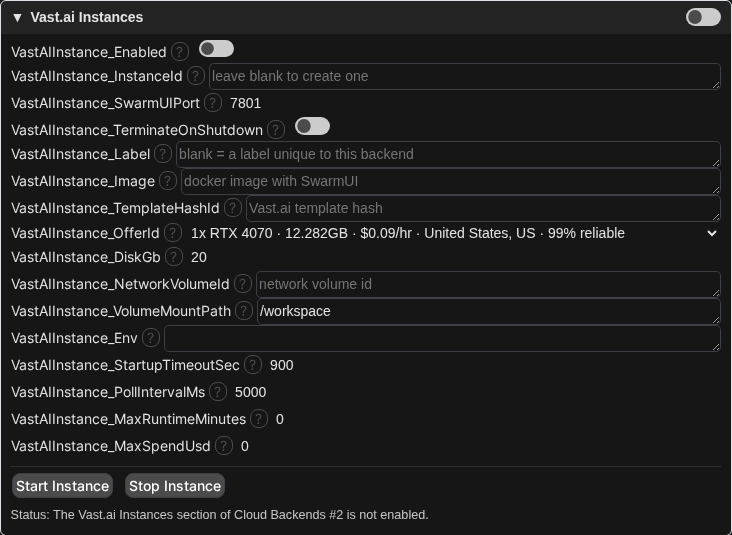
  • Instances are created from a specific rentable offer, not an abstract GPU type. Leave OfferId blank to search on-demand offers and take the cheapest match at create time. Vast has no RunPod style automatic retry across candidates.
  • There is no proxy domain. Vast maps your port to a random external port on a shared host IP, only known after creation, reachable at plain http://{ip}:{port} with no TLS and no authentication of its own.
  • Port exposure is a Docker -p flag, not a structured field. The extension adds it to the instance env automatically; the image just needs to bind that port inside the container.
  • Creating a brand new named network volume is not supported yet. Attach one you already created via NetworkVolumeId.
Vast.ai Instances section with a real offer selected
The offer dropdown, listing dozens of real rentable offers sorted cheapest first.

Measured behavior

Serverless timings from live runs against an RTX class worker, SDXL at 1024x1024 and 12 steps.

Operation Time
Wake onto a FlashBoot warm worker, including discovery of 27 models 15 to 40 s
Fully cold worker, from container start to first image 3 to 4 min
First generation on an already woken worker about 64 s
Warm generation, worker reused and model resident about 9 s
Recovery from an invalidated remote session about 9 s, refreshed in place with no re-wake
Teardown to zero running workers and zero queued jobs immediate on backend disable

Pods, live end to end: a pod created and SwarmUI answering on an RTX PRO 4500 Blackwell with a warm network volume in about 3 minutes, the Swarm backend reaching running within seconds of that, a generation through the attached backend in about 60 s including ComfyUI's own model load, and termination on disable leaving zero pods on the account.

Per-user tenancy, live end to end against a real account on an RTX 2000 Ada auto-picked as cheapest available: child backend spawned on demand, real pod created and answering in about 3 minutes, a real image generated in 70 s, then cleanly terminated. Total pod lifetime about 7 minutes, roughly $0.03.

Two behaviors worth knowing about RunPod

Cancelling a running RunPod job terminates the worker executing it. So "cancel the old keepalive, submit a new one" kills the very worker you are trying to keep alive. Observed live: a healthy worker died about 13 seconds after such a cancel, and every later call to its proxy URL returned an empty body. Keepalives are blocking and run one at a time, so this extension extends a worker by submitting an additional job that queues behind the current one.

A cold worker's proxy answers with empty bodies for the first few minutes, byte for byte identical to a dead worker. The backend retries, then waits it out rather than concluding the worker died, so a cold start costs one wake instead of a cascade of them.

Notes and limitations

  • Cloud models must be discovered before you can generate with them. Call /API/CloudRefreshModels once per server start. It is a deliberate action because it wakes a billed worker.
  • The model list is merged across users' serverless backends, because core's model-list hook carries no user context. Generation itself stays strictly per-user.
  • Editing the Cloud Backends card restarts it, which drops every user's hidden children. Users get fresh ones on next use.
  • API keys are stored cleartext in Data/Users.ldb by core's per-user key store. Protect that directory accordingly.
  • GenerationTimeoutSec above 600 is capped by the shared HTTP client's 10 minute ceiling.
  • KeepaliveSeconds, default 420, is what you pay for while idle, so lower is cheaper. It is automatically raised to at least GenerationTimeoutSec plus two minutes so a worker is never torn down mid generation.

Troubleshooting

RunPod API key was rejected (401)

The key in User Settings is wrong or revoked.

RunPod endpoint not found (404)

The EndpointId backend setting does not match a real endpoint.

Cloud worker is running SwarmUI, but that SwarmUI has no backends configured

The worker booted, but its own SwarmUI has no backend. Open the worker URL given in the message, go to Server > Backends, and add one.

Cloud worker refused to load a model

The model is not present on the worker, or its backend cannot load it.

Did not complete within N seconds

The worker did not wake in time. Raise StartupTimeoutSec, or check the RunPod console for capacity problems.

A pod attaches and shows running, but generation says no backend matches

The pod's own SwarmUI has no backend configured. Open the pod's SwarmUI directly, add one under Server > Backends, and it will be picked up automatically within a few seconds.

Could not create a RunPod pod on any candidate GPU

Every GPU tried came back unavailable or rejected. Check the account balance, or set GpuTypeId explicitly and check its availability in the dropdown.

Comments

Your avatar